Please wait, while our marmots are preparing the hot chocolate…
Comments? {no-print} # @chunk: chunks/objectives.md ## Design of Web Applications {var-cours-n} : Overview {#plan overview} - Introduction {intro} - HTML and DOM {dom} - Styling and CSS {styling} - More {more} # @copy:#plan # @copy:#plan: %+class:inred: .intro ## Client Side Technologies {/no-status} // hum - A few langages {dense} - HTML (declarative langage): page structure {html} - CSS (declarative langage) : styling of elements {css} // including le hover sur les widgets - Javascript (imperative/functional langage) : behavior {js} // le form dont avec le bouton + click l'image - *Java, PHP, Python, ... : server-side behavior* {server} // also js - @anim: .html + .TIB | .TIB p.par | .TIB img | .TIB ol | .TIB form | .TIB p.links | .css - @anim: %+class:float:.TIB img - @anim: %+class:styly:.TIB - @anim: %+class:roman:.TIB ol - @anim: %+class:border:.TIB img - @anim: %+class:shadow:.TIB img - @anim: %+class:green:.TIB li - @anim: .js | .server
This is a paragraph with an image, followed by a list and a form and two links. All together, they form a web page.

- first interesting element
- second element
to infinity and beyond
- A set of nodes - representing the document - organized in a tree structure - navigable in any direction (parent, children, previous/next siblings) - A representation of an HTML document - tree of elements - each with possible attributes - With APIs - to manipulate the tree - available for most existing languages - (most importantly in this course, Javascript) ## Basic HTML Elements {libyli} ```html <h3>Demo</h3> <p class="hummm yeah"> This is a paragraph with an image then a list and a form and two links </p> <img src="media/kitten.jpg" width="200px" alt="kitten"> <ol> <li>first interesting element</li> <li>second element</li> </ol> <form> <input type="text" id="datext" placeholder="name..."> <input type="submit" value="go"> </form> <p class="links"> <a href="http://graphhopper.com/">to infinity</a> and <a href="https://cozy.io/">beyond</a> </p> {} ``` - Headings (`h1`...`h6`), paragraphs (`p`), ordered (numbered) and un-ordered lists (`ol`, `ul`), list items (`li`), images (`img`), links (`a`) {dense} - More: section, nav, article, code, sup, sub, blockquote, pre, table/tr/td, … {dense} - un-semantic blocks element (`div`) and inline element (`span`) {dense} # HTML: Questions? Demo? # @copy:#plan: %+class:inred: .styling # CSS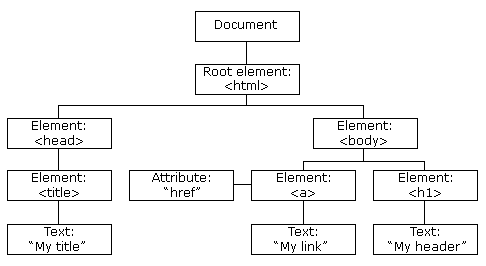
a cross-platform and language-independent convention for representing and interacting with objects in HTML, XHTML, and XML documents
never go out of style ## Making the Web, With Style
This is a first paragraph.
This is a second paragraph.
included with a `link rel="stylesheet"` element ## Basic CSS Selectors … {libyli} - Element selector - `*`: any element (any node in the tree) - `e`: any element of type `e` (any node *<e>{smartcode}*) - Class selector - `.c`: any element with class `c` (e.g. *<p class="toto c z">{smartcode}*) - Identifier selector - `#toto`: any element with identifier `toto` (e.g. *<p id="toto">{smartcode}*) - Conjunctions of selectors (no spaces) and “or” - `e.c`: any element of type `e` with class `c` - `e.c.d`: any element of type `e` with both class `c` and `d` - `e#i`: element of type `e` if it has id `i` - `E, F`: any element matching `E` or `F` - Children and descendants - `E F`: any `F` that is a **descendant** of a `E` - *E > F{smartcode}* (or *E>F{smartcode}*): any `F` that is a **child** of a `E` ## More Advanced CSS Selectors {libyli} - Attribute filters - `E[attt]`: any `E` with a `attt` attribute - `E[attt="toto"]`: any `E` with a `attt` attribute equal to `toto` - `E[attt*="toto"]`: any `E` with a `attt` attribute contains `toto` - … - Pseudo-classes - `:visited`: any already visited link - `:hover`: an element with the mouse hovering it - Following siblings - `E + F`: any `F` that **immediately** follows an `E` - `E ~ F`: any `F` that follows an `E` # CSS Styling: Questions? Demo? # CSS Styling: Box Model − Live ## CSS Styling: Box Model {libyli} @SVG:media/border4.svg 200px 200px {floatright defaults}
The box model
> inline-style
> (CSS RULES) selector-specificity
> (CSS RULES) rule-order
> parent-inheritance
> browser-default - Selector specificity (try) {selectors} - *p {color: white;}* 1 - *p em {color: green;}* 2 - *div p em {color: green;}* 3 - *.fancy {color: red;}* 1,0 - *p.fancy {color: blue;}* 1,1 - *p.fancy em.cool {color: yellow;}* 2,2 - *#id218 {color: brown;}* 1,0,0 - *(inline) style="…"* 1,0,0,0 ## Different Ways of Adding Style {libyli} 1. Inline, with style attribute - priority over other solutions - thus, difficult to override - *recommendation*: do not use it 2. Using CSS rules (preferred way) {listisalpha} 1. in a `style` element 2. in a file included via a `link rel="stylesheet"` element ```html <!DOCTYPE html> <html lang="en"> <head> <meta charset="utf-8"> <title>title</title> <link rel="stylesheet" href="allblue.css"> <style> p {color: red;} </style> </head> <body> <p style="color: green">This is a paragraph.</p> </body> </html> {slide dense} ``` # @copy:#plan: %+class:inred: .more ## Potentially Useful Tools for Experimentation - Your favorite editor + a browser + F5 (or an auto-refresh) - Your browsers "dev tools" (Ctrl+Shift+I) - A live CSS editor with autocompletion, in your browser, like liveweave - A CSS-aware IDE for auto-completion - An IDE with live CSS edition (e.g. in netbeans) ## Next - HTML+CSS+… + practice - Installation help-desk ## Key Points {key deck-status-fake-end} - ?
/ − − will be replaced by the title

